

- Smart firearm lock
- iOS & Android
GunLox case study
Revolutionizing firearm security with the GunLox smart lock app.
- Platform
- iOS & Android
- Features delivered
- 10
- Lead stack
- Node.js, React Native
Overview
Revolutionizing firearm security with the GunLox smart lock app.
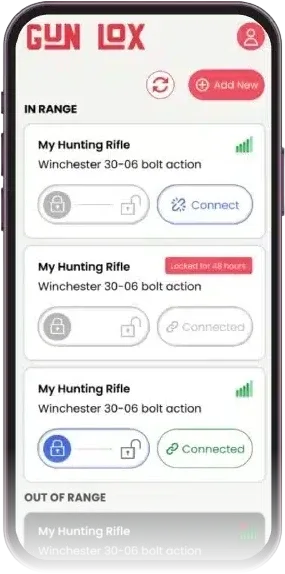
The GunLox Smart Firearm Lock Companion App brings a new level of security and convenience to firearm management. With Bluetooth-enabled locking, users can easily control their smart gun locks through the app, which offers features like firearm tracking, usage logs, and remote access.
JumpGrowth Solutions designed and built this cross-platform application, delivering a smooth and consistent user experience on Android, iOS, and web platforms
- Category
- Smart firearm lock
- Platform
- iOS & Android
- Built with
- Node.js
- React Native
- NGINX
- Angular
- MongoDB
At a glance
- 04Problems solved
- 10Features delivered
- 02Platforms
- 05Technologies
- Cross-Platform Mobile Application2
- Web Admin Panel4
- Widgets for iOS and Android2
- Security Features: Biometric Security2
10 features across 4 parts of GunLox.
- ClientReact Native, Angular
- ServicesNode.js
- DataMongoDB
- Cloud & hostingNGINX
The problem
Firearm security is a critical concern, and traditional lock mechanisms lack the real-time management and tracking capabilities required for modern security standards. The need to securely store firearms, monitor their usage, and grant controlled access to trusted individuals became a top priority for Gun Lox.
The main challenges that needed to be addressed included:
- 01
Lack of Real-Time Control
Traditional manual locks couldn’t offer real-time monitoring or detailed user activity logs.
- 02
Limited Remote Management
Users could not manage or monitor their firearms remotely, causing inconvenience and potential risks.
- 03
Insecure Access Sharing
Sharing firearm access securely with others was a significant challenge.
- 04
Complex Firearm Management
There was no simple, unified system for managing multiple firearms efficiently and securely
The solution
JumpGrowth implemented an agile development approach to create the Gun Lox app, prioritizing scalability, security, and intuitive design. The solution includes a mobile app, interactive widgets, and an admin web panel, each tailored with features to simplify and enhance firearm management, which ensures that the Gun Lox app is flexible and secure, meeting user needs with ease and reliability.
Cross-Platform Mobile Application
- 01
Virtual Safe
Users can manage and add multiple firearms to their virtual safe, where each firearm’s details (name, serial number, model) are stored.
- 02
Multi-User Authorization
Users can authorize others to access their firearms remotely, setting permissions through the app.
Web Admin Panel
- 01
User Management
Administrators can view and manage users, including the ability to block or unblock accounts.
- 02
Firearm Management
Admins can review detailed firearm logs, including serial numbers and activity history.
- 03
Log Review
The system tracks all interactions with the firearms, including locking/unlocking events, and provides detailed logs accessible to both the admin and users.
- 04
Password Management
Admins and users can securely reset their passwords through the admin panel, which employs encryption protocols to safeguard sensitive information
Widgets for iOS and Android
- 01
Mobile Widgets
JumpGrowth integrated widgets for Android and iOS to provide quicker access. These allow users to unlock, relock, or remove the lock from the firearm without opening the full app.
- 02
Widget Actions
The widgets utilize slide actions to reveal controls for unlocking and locking firearms, adding a layer of convenience for users handling multiple firearms.
Security Features: Biometric Security
- 01
Session Management
User sessions are timed to expire after inactivity, reducing the risk of unauthorized access.
- 02
HTTPS and Encryption
All data transmitted between the app and server is encrypted over HTTPS to ensure that sensitive information is protected.
Under the hood
- 01 · Client
What people touch: the product on iOS & Android.
- React Native
- Angular
- 02 · Services
The logic behind it: APIs, business rules and integrations.
- Node.js
- 03 · Data
Where the product keeps its records.
- MongoDB
- 04 · Cloud & hosting
How it is served, scaled and kept running.
- NGINX
- One React Native codebase serves the mobile apps, so every release reaches iOS and Android together.
- A web admin panel gives the client control of users, content and logs without a developer.
- Home-screen widgets put the main actions one tap away, without opening the full app.
Build your team
Share where the roadmap is blocked and the capabilities you need. We’ll map a practical team and delivery model.